
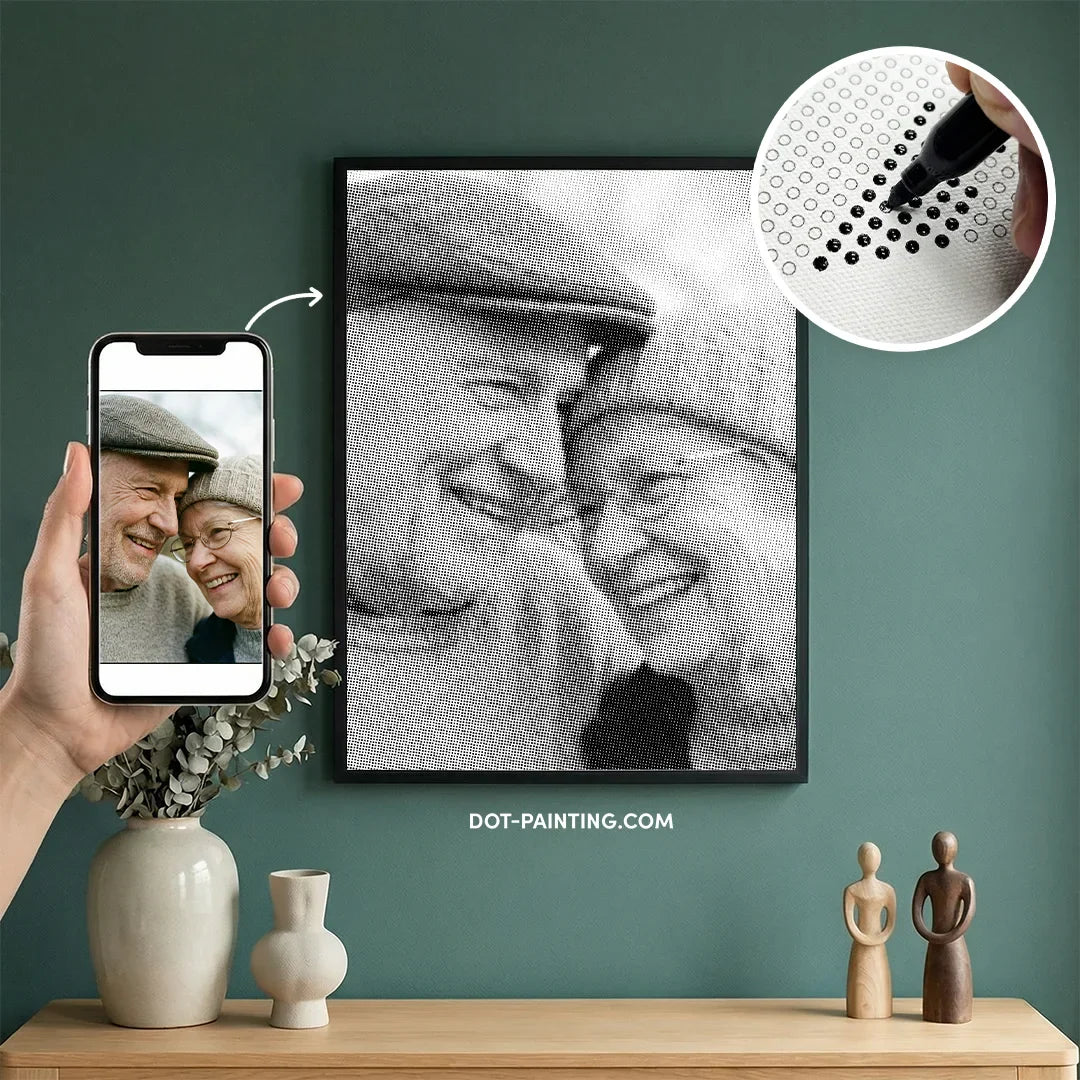
We all have thousands of photos trapped in our phones that perfect holiday sunset, a candid smile from a loved one, or a portrait of a pet who means the world to us. But how often do we actually stop to look at them? With a Custom Dot Painting kit, you can rescue that memory from your digital gallery and transform it into a stunning, physical piece of art that you can hang on your wall forever.
This is more than just ordering a poster or a print. It is a personal creative journey. You aren't just looking at the photo; you are rebuilding it yourself, dot by dot. Whether it is a gift for a partner or a tribute to a cherished moment, the time and focus you pour into the canvas make the final result infinitely more meaningful than anything you could buy off a shelf.
The process is simple: you provide the photo, and we handle the technical magic. Our designers transform your image into a precision dot pattern optimized for clarity and ease. We send you everything you need—the custom canvas, the matched markers, and the guide so you can simply relax and bring your favorite memory to life.

How It Works: From Photo to Kit
Step 1: Upload and Order
The process begins with your vision. Simply select the canvas size you want and upload your photo directly on the product page. We accept most standard image formats from your phone or computer. Once you place the order, your job is done and ours begins.
Step 2: The Magic Conversion
This is where we differ from standard automated apps. Your photo is not just run through a basic filter. Our design team reviews the image to ensure the subject is clear and the colors translate well into the dot palette. We optimize the contrast and brightness specifically for dot painting to ensure the final result looks as close to your memory as possible.
Step 3: Unbox and Create
Within a few days, a custom package arrives at your door. Inside, you will find a canvas pre-printed with your specific image structure, a set of markers hand-picked to match your photo's colors, and a simple guide. All you have to do is unbox it, find a comfortable spot, and start placing your dots.

The Golden Rules for a Perfect Photo
The final quality of your artwork depends almost entirely on the quality of the photo you upload. Because dot painting uses large "pixels" (dots) to create an image, not every photo works well. Follow these four rules to ensure your custom kit looks amazing.
Rule 1: Lighting Is Everything
Good lighting is the difference between a vibrant portrait and a dull gray blur. Avoid photos taken in dark rooms or with strong flash that creates harsh, black shadows. The best photos are taken in soft, natural daylight where the face is evenly lit. If the original photo is dark or grainy, the markers will be dark and the details will be lost.
Rule 2: Close-Ups Are King
This is the most common mistake beginners make. Remember that a dot is much larger than a pixel on a screen. If you upload a photo of a large group of people standing far away, their faces will be too small to render with dots. For the best result, choose a photo where the subject fills the frame. Head-and-shoulder portraits or close-ups of pets work beautifully because there is enough room for the dots to capture the details of the eyes and smile.
Rule 3: Mind the Contrast
Your subject needs to stand out from the background. If you have a black dog sitting on a dark brown couch, the dots will blend together, and the shape of the pet will disappear. Look for photos with a clear distinction between the subject and the surroundings. A bright background behind a dark subject (or vice versa) creates the crispest, most professional-looking result.
Rule 4: Resolution Matters
While you don't need a professional camera, we do need a clear file. Please avoid uploading screenshots, as they often have low quality. Try to use the original photo file from your phone or camera. If you zoom in on the photo and it looks blocky or blurry on your screen, it will look blurry on the canvas too. Sharp, clear original files always yield the best paintings.

What to Avoid (The Common Pitfalls)
Avoid Dark or Night Photos
Shadows are the enemy of clarity in dot painting. If you upload a photo taken at night or in a dimly lit room, the software may interpret the subtle shadows as one solid dark color. Instead of a detailed face, you might end up with a canvas that is mostly black or dark gray blobs. Always prioritize brightness.
Avoid Busy Backgrounds
A photo with a "noisy" background—like a crowded street, a dense forest, or a messy room—can clutter the final image. Since dots simplify an image, a busy background can start to look like random confetti, taking focus away from your subject. Simple, clean backgrounds work best to make your subject pop.
Avoid Large Group Photos
It is tempting to use a family reunion photo with ten people, but on a standard canvas, those faces will become tiny. A face that is only an inch wide on the canvas might only be made up of ten or twenty dots. That is not enough to show eyes, a nose, or a smile. Stick to one, two, or three subjects max to ensure everyone looks like themselves.
Why Our "Manual Check" Makes the Difference
There are plenty of sites where you upload a photo and a computer automatically generates a kit, no matter how bad the image is. We do things differently. At Dot-Painting.com, we believe you should only pay for a result you are going to love. That is why every single photo is checked by a human designer before it goes to print.
If your photo is too dark, too blurry, or the subject is too far away, we will not just print it and hope for the best. We will pause your order and email you to ask for a better file. We want to save you from the disappointment of spending hours on a painting that doesn't look right.
We also optimize the composition for you. If there is too much empty space above your head or the subject is slightly off-center, our designers will crop and frame the image to ensure it translates perfectly into the dot format. We handle the technical side so you can focus on the creative side.

Choosing the Right Size for Your Photo
One of the most common questions we get is, "What size should I buy?" The answer depends entirely on the photo you want to use. Because dot painting relies on resolution, a larger canvas always equals more detail.
Small Canvas: The Solo Portrait
If you are choosing a smaller size, simplicity is your best friend. These canvases are perfect for a close-up of a single face or a pet portrait. Because the surface area is limited, you want the subject to fill the entire frame. If you try to squeeze a full-body shot or a group photo onto a small canvas, the faces will lack definition.
Medium Canvas: The Couple's Choice
A medium-sized canvas offers a great balance between detail and time. It is the ideal choice for a photo of two people (like a couple's selfie or a wedding shot) or a "head and shoulders" portrait where you want to capture more than just the face. It gives the dots enough room to define features clearly without taking up your entire wall.
Large Canvas: The Masterpiece
If you have a photo with more than two people, a complex background, or fine details you really want to preserve, go large. A large canvas acts like a higher-resolution screen; it has thousands more dots, which allows for subtle shading, distinct facial features in groups, and a truly impressive final result. When in doubt, sizing up is always the safer bet for quality.
What Is Inside Your Custom Kit?
We pack everything you need to go from unboxing to finishing. Your box includes a high-quality artist canvas that is pre-printed with your custom photo structure. We analyze your image and include a set of markers specifically selected to match the colors of your photo. You also get a clear reference guide to help you verify the pattern as you work.
Curious about the specific markers or tools we use? You can read a full breakdown of our materials on our Tools Explained page.
FAQ: Custom Orders
Can I see a preview before you print?
Because our design process involves manual work by real artists rather than an instant automated filter, we do not generate an instant preview at checkout. However, you can trust our "Manual Check" promise. If our designers notice that your photo will not translate well into dots, we will pause the order and contact you before we print anything.
What if my photo isn't good enough?
We are on your side. If you upload a photo that is too dark, blurry, or low-resolution, we will not simply take your money and ship a bad product. We will email you to explain the issue and ask for a better file. We want you to be thrilled with the result, so we act as a quality filter for you.
How long does shipping take for custom items?
Because your kit is made to order specifically for you, it takes a little longer than our standard in-stock designs. Please allow a few extra days for the design and printing phase. Once your custom kit is packed and shipped, you will receive a tracking number just like a normal order. The wait is worth it for a truly one-of-a-kind piece.